
Building A CRUD Application Using Node JS And MongoDB Atlas

Hello Folks!!
In this article, we will learn how we can use MongoDB database in Node JS using Mogoose library, which is a very popular library widely used in the Industries.
In this article we had used the
MongoDB Cloudservice called MongoDB Atlas, you can also use the MongoDB server runninglocally, the process remains the same.
What is Mongoose?
Mongoose is an Object Data Modeling (ODM) library for MongoDB and Node.js. It manages relationships between data, provides schema validation, and is used to translate between objects in code and the representation of those objects in MongoDB.
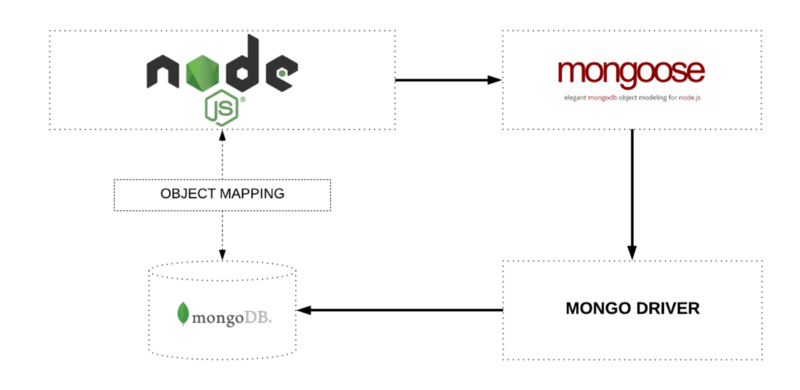
MongoDb VS SQL
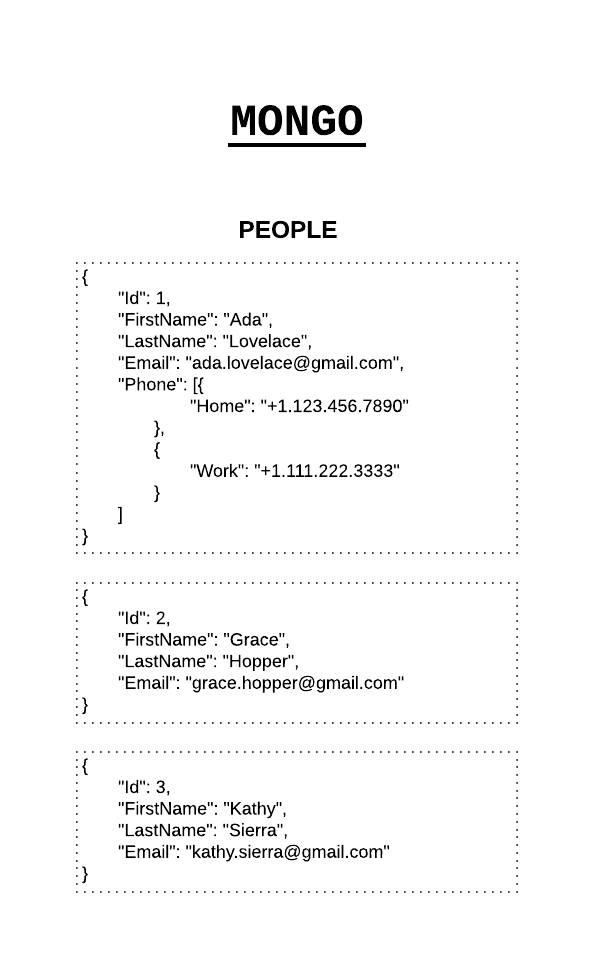
MongoDB is a schema-less NoSQL document database. It means you can store JSON documents in it, and the structure of these documents can vary as it is not enforced like SQL databases. This is one of the advantages of using NoSQL as it speeds up application development and reduces the complexity of deployments.
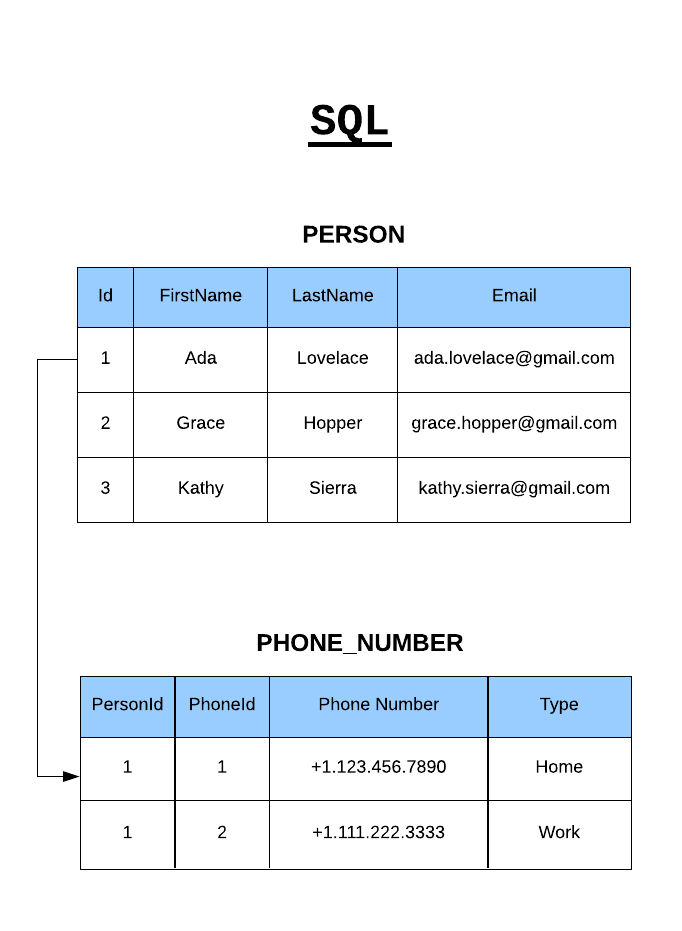
Below is an example of how data is stored in Mongo vs. SQL Database:
Mongoose has great documentation, checkout the docs here to learn more about Mongoose.
Mongoose Terminologies
Collections
'Collections' in Mongo are equivalent to tables in relational databases. They can hold multiple JSON documents.
Documents
'Documents' are equivalent to records or rows of data in SQL. While a SQL row can reference data in other tables, Mongo documents usually combine that in a document.
Fields
'Fields' or attributes are similar to columns in a SQL table.
Schema
While Mongo is schema-less, SQL defines a schema via the table definition. A Mongoose 'schema' is a document data structure (or shape of the document) that is enforced via the application layer.
Models
'Models' are higher-order constructors that take a schema and create an instance of a document equivalent to records in a relational database.
Mongoose In Action
Referencing
So now, we will see a subtle difference between Mongoose Schema and Model, after that we will start working with mongoose and we will proceed further step by step explain each concept.
Mongoose Schema vs. Model
A Mongoose model is a wrapper on the Mongoose schema. A Mongoose schema defines the structure of the document, default values, validators, etc., whereas a Mongoose model provides an interface to the database for creating, querying, updating, deleting records, etc.
Don't Jump for coding right now, have some patience and for now just read the sections, in further section we will create and setup the project step by step : )
Creating a Mongoose model comprises primarily of three parts:
- Referencing Mongoose
- Defining the Schema
- Exporting a Model
1. Referencing Mongoose
const mongoose = require('mongoose')
This reference will be the same as the one that was returned when we connected to the database, which means the schema and model definitions will not need to explicitly connect to the database, we will see database connection in the further section.
now, lets create a reference to Schema class from mongoose:
const Schema = mongoose.Schema;
Now let's move on to create our very own Schema.
2. Defining the Schema
const todoSchema = new Schema(
  {
    description: {
      type: String,
      required: true,
    },
  },
);
So here we have created an instance of Schema and named it todoSchema. The Schema takes object as a parameter, so we had passed an object and inside that we have a key called description and its value is again an object in which we had specified we need a field description of type "String", this type is in-built with mongoose you can refer more on official docs and also it is a required field so we had defined this with the key required and with a boolean value of true.
Lets add more field into the schema,
const todoSchema = new Schema(
  {
    description: {
      type: String,
      required: true,
    },
    completed: {
      type: Boolean,
      default: false,
    },
  },
  {
    timestamps: true,
  }
);
So similarly we had define a field called completed and it is of type Boolean and it hold a default value false.
And if you carefully looked at the structure we had passed a second parameter which is an object with a key timestamps so this second parameter is a configuration object in which we had only used an inbuilt feature of mongoose which adds to additional fields to every documents namely createdAt and updatedAt.
The following Schema Types are permitted:
- Array
- Boolean
- Buffer
- Date
- Mixed (A generic / flexible data type)
- Number
- ObjectId
- String
3. Exporting a Model
Finally, let's create the model using the Schema we had created and Export the model to use it in other modules where we need to interact with the database.
We need to call the model constructor on the Mongoose instance and pass it the name of the collection and a reference to the schema definition.
var Todos = mongoose.model("Todo", todoSchema);
And now finally let's export this model so that we can use this model throughout the project.
module.exports = Todos;
Now, we understand how we can define a schema and using schema how we can make our model. So this was the major part of the Mongoose model creation and now we have to make use of this model.
Next, we will see how to setup the project and start writing some code.
Creating an Application
So let's create a project folder node-mongoose and inside your project folder create a folder called models and inside that create a file called todos.js and paste below code into it and your todos.js model file should look like this:
// models/todos.js

const mongoose = require("mongoose");
const Schema = mongoose.Schema;

const todoSchema = new Schema(
  {
    description: {
      type: String,
      required: [true, "please enter task details"],
    },
    completed: {
      type: Boolean,
      default: false,
    },
  },
  {
    timestamps: true,
  }
);

var Todos = mongoose.model("Todo", todoSchema);

module.exports = Todos;
Previously we had implemented this model, if you haven't followed that checkout the Referencing Mongoose Section above, then you are good to continue this section.
Folder Structure:
node-mongoose
  - models
     - todos.js
Now, open a terminal in node-mongoose i.e root folder of your project and follow below steps:-
npm init -y- Create a file called
app.js - Install express using
npm install express - Install mongoose using
npm install mongoose - Install dotenv using
npm install dotenv - Create a file called
app.jsin root folder of your project - Now follow the steps in this blog and get the
database urlwhich will look like this :mongodb+srv://sample_user:<password>@my-sample-cluster-b3ugy.mongodb.net/<dbname>?retryWrites=true&w=majority - Create a
.envfile in the root folder - Add this line in the .env file with your password and database name
DATABASE_URL=mongodb+srv://sample_user:<password>@my-sample-cluster-b3ugy.mongodb.net/<dbname>?retryWrites=true&w=majority - Also to ensure your database connection should not visible to other if you are storing your code on a service like Github. Create a
.gitignorefile and enter the file name.envinside it. So git will not keep track of this file. - Also add one more variable on new line inside
.envfile calledPORT=3000
Your .env file should look like:
DATABASE_URL=mongodb+srv://sample_user:<password>@my-sample-cluster-b3ugy.mongodb.net/<dbname>?retryWrites=true&w=majority
PORT=3000
Your .gitignore file should look like
node_modules
.env
Now, lets import the packages we have install into the app.js file
const express = require("express");
const mongoose = require("mongoose");
const dotenv = require("dotenv");
Now, lets load the environment variable
dotenv.config({ path: ".env" });
const PORT = process.env.PORT;
const dbURI = process.env.DATABASE_URL;
Now lets import the model todos we have created inside the models/ folder
//model
const Tasks = require("./models/todos");
now , lets create a database connection:
const connect = mongoose.connect(dbURI, {
  useNewUrlParser: true,
  useUnifiedTopology: true,
});

connect.then(
  (db) => {
    console.log("Connected Successfully to Mongodb Server");

  },
  (err) => {
    console.log(err);
  }
);
Lets initialize the express app:
const app = express();
Lets add a middleware which converts the request body into json:
app.use(express.json());
Finally lets create a listener to accept incoming HTTP request on specific port:
app.listen(PORT, () => {
  console.log(`Server is running at http://localhost:${PORT}`);
});
Your Final app.js should look like this:
const express = require("express");
const mongoose = require("mongoose");
const dotenv = require("dotenv");

dotenv.config({ path: ".env" });
const PORT = process.env.PORT;
const dbURI = process.env.DATABASE_URL;

//model
const Tasks = require("./models/todos");

const connect = mongoose.connect(dbURI, {
  useNewUrlParser: true,
  useUnifiedTopology: true,
});

connect.then(
  (db) => {
    console.log("Connected Successfully to Mongodb Server");

  },
  (err) => {
    console.log(err);
  }
);

const app = express();

app.use(express.json());

app.listen(PORT, () => {
  console.log(`Server is running at http://localhost:${PORT}`);
});
Now we are good to go with basic CRUD operations.
Mongoose CRUD Operations
Mongoose has a flexible API and provides many ways to accomplish a task. We will not focus on the variations because that is out of scope for this article, but remember that most of the operations can be done in more than one way either syntactically or via the application architecture.
Create Record
Let's create a todo and save into our database:
let newTask = {
      description: "task added using create",
};

Tasks.create(newTask)
  .then((data) => {
      console.log(data);
   })
   .catch((err) => {
      console.log(err);
});
Firstly we had created a newTask object with description of a todo which is a mandatory field required to create a document in the database. Mongoose model has a create() method which is a promise and on successful we get the response in data and in-case of failure it is catched and error is displayed.
Find All Tasks
To get all the documents stored inside a collection.
//all tasks

Tasks.find({})
   .then((data) => {
       console.log("All tasks", data);
    })
    .catch((err) => {
       console.log(err);
 });
Find A Single Document or Record
Let's see how we can find a single document from the collection.
 //find with condition

  Tasks.find({ completed: false })
    .then((data) => {
         console.log("All tasks", data);
     })
     .catch((err) => {
         console.log(err);
    });
Update a Document
Let's modify the record by updating the status completed:false to completed:true
    Tasks.findByIdAndUpdate({ _id: req.params.id },{
            $set: {completed:true},
          },
          { new: true, useFindAndModify: false } //get updated result
       )
       .then((data) => {
         console.log("Updated todo data", data);
       })
       .catch((err) => {
         console.log(err);
       });
Delete a document from the collection
 //delete all tasks
     Tasks.remove({});
// delete specific task

    Tasks.findByIdAndRemove(task_id)
       .then((data) => {
         console.log("All tasks", data);
       })
       .catch((err) => {
         console.log(err);
       });
In the above example replace the task_id with the value of _id of a task in mongoDB databse which looks like 5a78fe3e2f44ba8f85a2409a
So we have seen all the CRUD operations namely, create, read, update, delete
Let's use them in our app.js file.
const express = require("express");
const mongoose = require("mongoose");
const dotenv = require("dotenv");

dotenv.config({ path: ".env" });
const PORT = process.env.PORT;
const dbURI = process.env.DATABASE_URL;

//model
const Tasks = require("./models/todos");

const connect = mongoose.connect(dbURI, {
  useNewUrlParser: true,
  useUnifiedTopology: true,
});

connect.then(
  (db) => {
    console.log("Connected Successfully to Mongodb Server");

    //all tasks
    Tasks.find({})
      .then((data) => {
        console.log("All tasks", data);
      })
      .catch((err) => {
        console.log(err);
      });

    // similary use all the other operation here

    // CAUTION: don't put all the operation together, use one operation
    // at a time
  },
  (err) => {
    console.log(err);
  }
);

const app = express();

app.use(express.json());

app.listen(PORT, () => {
  console.log(`Server is running at http://localhost:${PORT}`);
});
Now, run your server by using the following command:
first install,
npm install -g nodemon
then,
nodemon app.js
Congratulations !! We had learned the fundamentals of Mongoose and How we can use it in Node JS.
I hope this article helped you to understand the core idea : ) Do give a like to this article to motivate me to write more : D


